Every reply, form and lead from every client’s campaigns, in one inbox under your name.
Replies to a client’s campaigns, and every form filled in, arrive in one inbox, filed by business and by campaign, with the person beside every conversation: their clicks, their forms and any sequence they’re in. Answer for your clients, or let them answer for themselves. There is no cap on conversations, and your clients see your name on it, never ours.
Wendy filled in the checklist form at 7:40. Mike asked about Saturdays at 8:15.
Two people, one cleaning company, and the agency that answers for it, followed through one morning on a sample workspace.
Your agency runs email for Coastal Cleaning Co. Their spring campaign, 20% off a full deep clean, went out last week with a landing page and a free move-out checklist. You sell them the campaigns, and one thing more: your team answers the people who reply, so Jess, who owns the company, hears only about the ones ready to book.
Wendy’s form arrives as a conversation
At 7:40 on Tuesday, Wendy fills in the form for the Free Move-Out Cleaning Checklist. Her entry is kept, and it arrives in the inbox as a conversation, under Coastal Cleaning Co and the form that took it. Beside it is who she is and what she has done: the campaign she clicked, the form she filled in, and the sequence her form started.
Your account manager opens it, presses Suggest a reply, changes a line and sends it. It goes from the campaign’s own domain, the one that reached Wendy, signed with Coastal Cleaning Co’s signature, so it reads as the next line of a conversation she started.
Mike’s reply is filed by the address it came back to
At 8:15 Mike replies to the campaign itself: “Do you do Saturdays? I have four flats to turn round before new tenants move in on the Monday.” The address his reply went to carries the campaign, so it is filed under Coastal Cleaning Co and the spring offer without anyone sorting it. Mail from anyone the account never wrote to is never shown, so the inbox holds the people who answered, and nothing else.
A ready lead goes to the owner, in her own brand
Four flats on a Saturday is a job for Jess. Your account manager presses Pass to client, then Write it for me, and a short note for Jess is written from the conversation. Mike is in a sequence from the campaign, so the dialog offers to stop it, and she ticks it. Send confirmation.
Jess gets an email in Coastal Cleaning Co’s colours: “Warm lead for you”, with Mike’s phone number, the campaign he came from, your note and the conversation so far. It says it was passed on by your agency. Nothing in it names a platform.
She presses Call Mike from her phone between jobs. In the inbox his conversation shows Passed on, so your team knows it has been handed over.
Your team answered the questions. The owner got the lead that was ready, in her own brand, with your name on it.
Leads, stages and tasks, for every client
Everyone who clicks, fills in a form or replies is listed under Leads, on a board or in a table, by stage: engaged, warm, hot and won. Tasks holds the calls and to-dos for each lead: today’s, overdue and coming up. A client who answers their own leads opens the same inbox at your portal. A client you answer for sees “Your agency answers these for you”.
That is one morning for one client. Every reply and form from every client’s campaigns arrives the same way, and there is no cap on how many.
Three films: how the inbox is sorted, how to use it, and your agency’s own inbox at your domain.
Each is the real platform, on a sample workspace.
One inbox for every client: filed by business and campaign, with the person beside each conversation.
This is the screen your team and your clients use, at your domain, under your logo.
- Pick the business. Each one keeps its own conversations, campaigns, pages and forms.
- Its campaigns, pages and forms, listed as conversations arrive, with a count of what is waiting.
- To answer, all open, forms, starred, snoozed, passed on, done, auto-replies and spam: a view for each.
- A form filled in on the move-out checklist arrives as a conversation, ready to answer.
- A question about the spring offer, passed on to the owner and marked so.
- Settings: forward replies to your own email, sign replies, and look up a lead’s company.
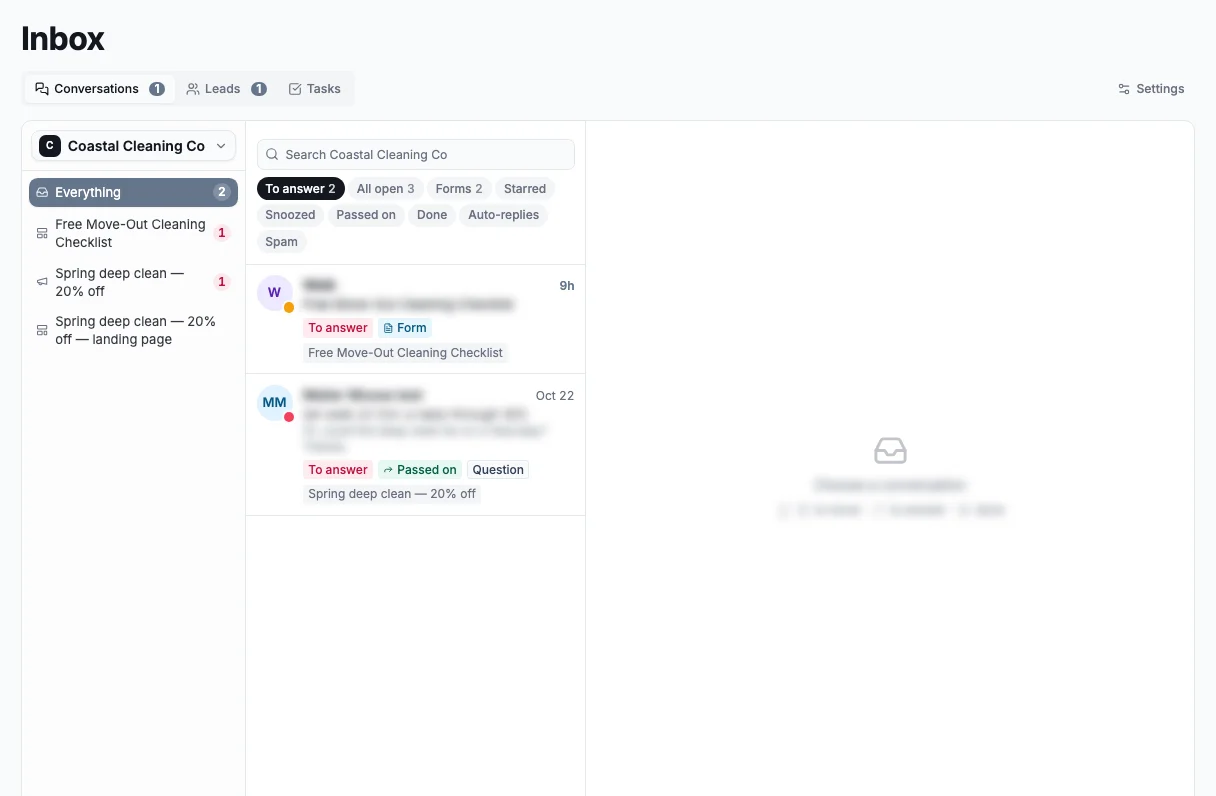
A sample workspace. The businesses on this screen are demo data.
Every reply filed under its business and campaign.
The address a reply goes to carries its campaign, so it is filed under the right business and campaign, beside the person who wrote it: their clicks, forms and replies, and any sequence they’re in.
A reply never stops a sequence. If someone needs a pause, you pause or stop their sequence from their conversation.
- Filed by business and campaign
- The person beside every conversation
- Their sequence paused or stopped from there
Who is waiting, who is warm, and what is due.
To answer shows who is waiting on a reply. Leads counts everyone who has shown interest, from engaged through warm and hot to won. Tasks holds the calls and to-dos for each lead.
In Settings, forward a copy of every reply to your own email, sign replies for a business with no signature of its own, and look up a lead’s company, website and phone.
- To answer, at a glance
- Leads by stage, engaged to won
- Tasks for every lead
Mail at your own domain, inside your dashboard.
Your agency has an inbox of its own, at your domain: Inbox, Sent, Archive, Spam and Trash. Read and reply there, or connect Apple Mail, Outlook, Thunderbird or your phone with an app password.
Rename your address, add new ones, and switch on catch-all for mail sent to any other address at your domain.
- Email at your own domain
- Catch-all for every other address
- In the mail app you already use
An inbox, a lead board and a hand-off your clients would otherwise pay six places for, unlimited, under your name.
Each line is in the one plan, for every client you bring. On the right, the kind of tool a business usually pays for to get the same job done.
| In SendTo | Instead of |
|---|---|
| Every reply and form, filed by business and campaign | Front or Help Scout |
| Leads on a board or a table, engaged to won, with tasks | HubSpot or Pipedrive |
| Replies from the domain that reached them, signed in the brand | A shared mailbox and a signature tool |
| Ready leads passed to the owner by email, in their brand | Zapier and a shared spreadsheet |
| Their sequence paused or stopped from the conversation | An automation tool and a CRM |
| Your name and logo on every screen your client sees | A custom build |
| Every one unlimited | One flat fee |
What you might be thinking, answered straight.
“Will my clients see each other’s leads?”
No. Each business has its own conversations, filed under its own campaigns, pages and forms, and your clients sign in to their own account, not yours.
“I don’t want to answer my clients’ leads for them.”
Then don’t. A client can answer from the same inbox at your portal. Or sell the answering as a service: your team replies, and passes the ready leads to the owner, in their brand.
“Won’t the inbox fill up with spam?”
Mail from anyone the account never wrote to is never shown. What arrives is a reply to a campaign or a form someone filled in, and auto-replies and spam each have a view of their own.
“What happens to a sequence when someone replies?”
It carries on until its emails run out. From the conversation you can pause, resume or stop it for that person, and passing a lead to your client offers to stop it for you.
“Is there a catch in “unlimited”?”
No cap on conversations, for any client. The inbox comes with the plans you choose to include it in, and the sending is usage, which your clients buy at the rate you set.
“I want to see it before I decide.”
Open the account: no card, and a sample workspace is ready when you confirm your email. Open the inbox and see how it’s laid out for a client.
The inbox, answered
What comes into the inbox?
Replies to your campaigns, and the forms people fill in, each as a conversation. Mail from anyone the account never wrote to is never shown.
How is it sorted?
By business, then by the campaign, page or form a conversation came from. Then by view: to answer, all open, forms, starred, snoozed, passed on, done, auto-replies and spam.
What do I see beside a conversation?
The person who wrote it: their clicks, forms and replies on each campaign, any sequence they’re in, and tasks for what to do next.
Can my team answer for a client?
Yes. Your team answers from the same inbox, from the domain that reached the person, signed with the brand’s signature. A client you answer for sees “Your agency answers these for you”.
How do I pass a lead to my client?
Press Pass to client on the conversation. Write it for me drafts a note from the conversation, and you can stop the person’s sequences in the same step. Your client gets an email in their brand with the lead’s details, your note and the conversation so far.
Does a reply stop a sequence?
No. A sequence ends when its emails run out. Pause, resume or stop it for one person from their conversation.
What are Leads and Tasks?
Leads lists everyone who has clicked, filled in a form or replied, on a board or in a table, by stage: engaged, warm, hot and won. Tasks holds the calls and to-dos for each lead, by when they are due.
Can replies come to my own email too?
Yes. In Settings, Forward replies to my email sends you a copy of each reply.
Do my clients ever see the SendTo name?
No. Your clients answer their leads at your portal, on your domain, under your logo, and a lead passed to them arrives in their own brand.
Do I need a card to try it?
No. Create your account and a sample workspace is ready when you confirm your email. Sending switches on when you activate.
The inbox, and everything else in the hub, unlimited. One plan. One flat fee.
Everyone who replies or fills in a form is someone your client paid to reach. The inbox puts each one in front of the person who should answer, under your name, with no cap on how many. Open your account free and see it laid out for a client.
No contract · Cancel any time · Explore everything before you pay