A website for every client, planned, written and designed from one brief, under your name.
Your client answers a short brief about the business and picks a look. The pages are planned, written and designed for them, with the main action on every page. They change any word on the page themselves, and put the site live at a free address or their own domain. There is no cap on websites or pages, and your clients see your name on it, never ours.
Helen wrote three sentences on Monday. On Thursday, Harbour & Co. went live.
One client’s website, followed from the brief to the day it went live, on a sample workspace. Your agency sold it; the platform built it.
Harbour & Co. is a pricing consultancy: three senior consultants who help owners set what they charge. Helen Marsh runs it, and your agency already runs its email. On Monday you add a website to what you sell her, and she opens Website at your portal and presses New website.
Monday: a brief, a look, and a plan with its reasons
The brief asks what a visitor would want to know: the name of the business and its current site, what it does, its services, what sets it apart, its proof, its prices, and how to reach it. Helen writes three sentences about the firm and fills in the rest from what she already has. She picks a look, and the plan comes back: the pages the site needs, what each one is for, and why.
Book a consultation is the action that matters to her, so it sits in the header and under the headline of every page. She presses Build my website and closes the tab. The pages are written and designed while she gets on with her day.
Tuesday: every word is hers to change
Helen opens the home page in the editor and clicks the headline to change a word. She drags a Testimonial block under the services and types in what a client said last spring. One section reads too formal for her, so she asks the AI to rewrite it plainer, and keeps the new version. Theme changes the colours and fonts of the whole site at once.
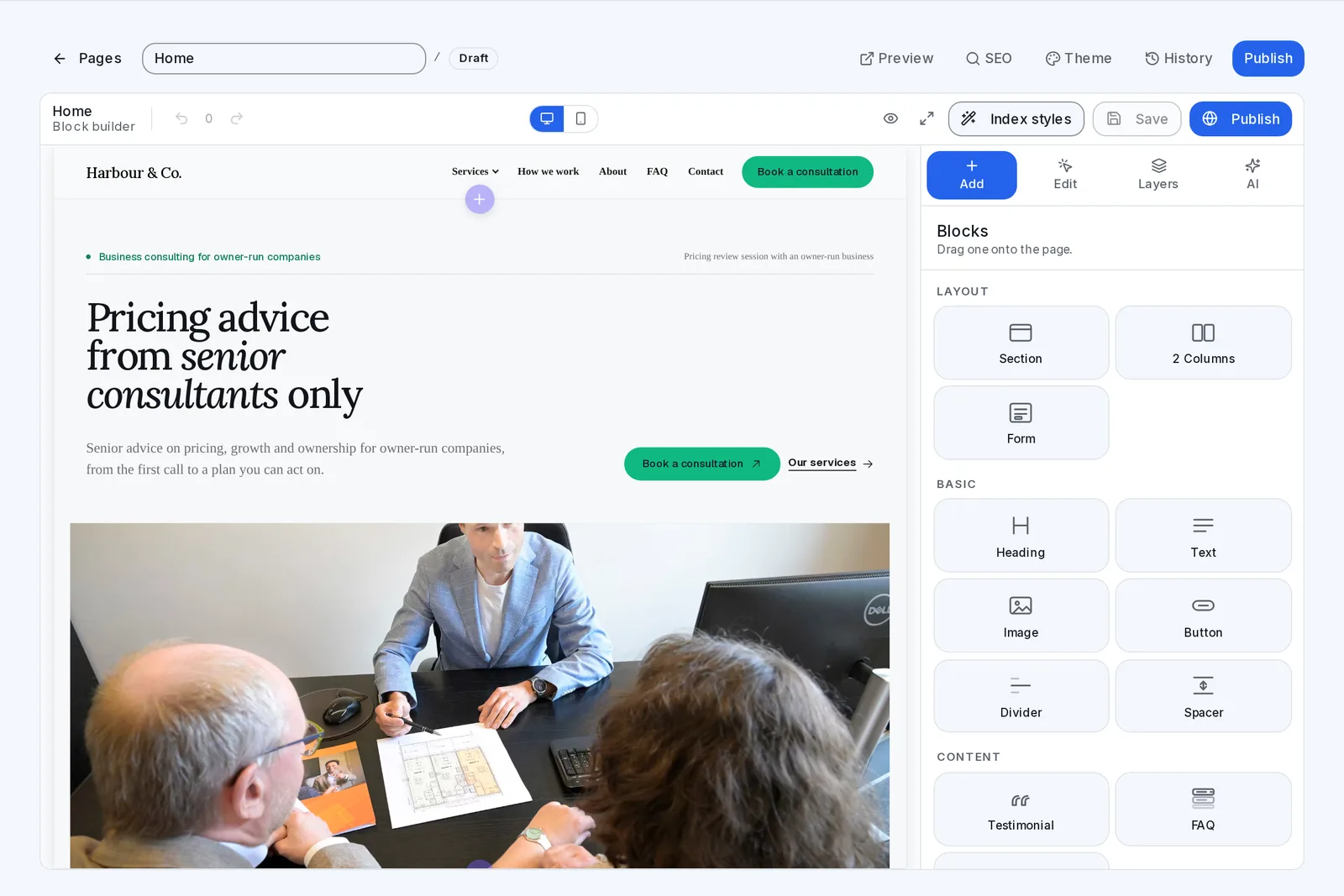
History keeps every version she saves. When she prefers Monday’s wording for one page, she brings it back, and it becomes a new version, so nothing is lost. None of it is public yet: the site waits as a draft until she publishes it.
Thursday: live at a free address, then at her own domain
On Thursday Helen presses Go live, and within a few minutes the site is public at a free address she can share. Then she adds her own domain. The platform gives her the one record to add where the domain is registered, checks it, and shows Working. The free address keeps working too, so a link she has already shared never breaks, and a website already on a domain is never taken over.
Helen wrote three sentences and picked a look. The plan, the words and the design came back with her name on them, and yours on the platform.
Enquiries come in, and an article becomes an email
Every entry from the website’s form lands in the Enquiries tab, and Helen chose one daily summary at 8am instead of an email for each. When she publishes an article about raising prices, its Distribute tab writes posts for her to copy to social media, and Send this to your list writes four versions of an email about it, saved as a campaign draft. Nothing sends until she launches it.
That is one website. Every client you bring can have theirs built the same way, and there is no cap on how many.
Five films: how a website is built, and how to build one, add a page, put it live and give it its own domain.
Each is the real platform, on a sample workspace.
Every website your client runs, in one list: what is live, and what is ready to publish.
This is the screen your client uses, at your domain, under your logo.
- New website: a business website, an online shop, bookings, courses, a membership or accommodation.
- Harbour & Co. is built and ready to publish. Nothing is public until your client says so.
- Live: each site shows where it stands, beside the kind of site it is.
- Every website gets a free address within a few minutes, and moves to its own domain whenever they like.
- An online shop is a website too: its products and orders sit beside its pages.
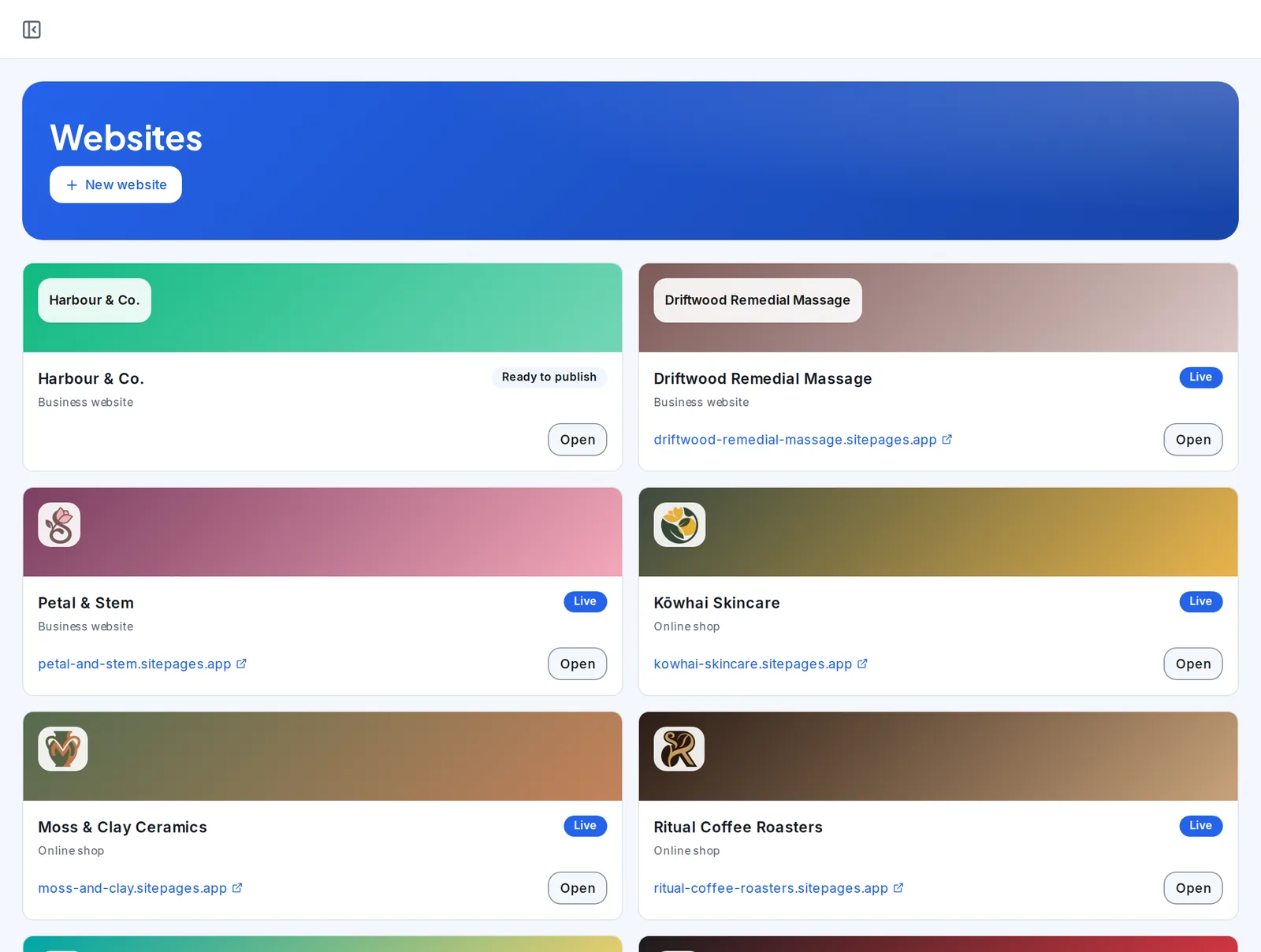
A sample workspace. The businesses on this screen are demo data.
One brief becomes the plan, the words and the design.
The brief asks what a visitor would want to know: what the business does, its services, what sets it apart, its proof, its prices and how to reach it. The plan comes first, page by page, with what each page is for.
Then every page is written and designed in the look your client picked, with the main action on each one.
- A plan, page by page, with its reasons
- Every page written and designed
- The main action on every page
New website, a brief, a look, and Build my website.
Choose the kind of site, answer the brief and pick a look. Build my website writes and designs the pages, and your client can close the tab while it works.
When it is ready, the site opens in the editor as a draft that nobody else can see.
- Six kinds of website
- A look to start from
- A draft until it is published
A new service, an offer or a question people keep asking, each with its own page.
New page asks what the page is for, since a sales page persuades and a service page explains one service. Then who will read it, what is on offer, any proof, and what a visitor should do next.
Create and generate writes and designs the page to match the rest of the website. In the editor, any words change with a click, and History brings back any version saved.
- A page for each kind of job
- Written for the person who searches
- Designed to match the site
Go live, and the site is public within minutes.
Before it goes live, the preview shows every page as visitors will see it. Go live puts the site at a free address within a few minutes.
Their own domain can follow whenever they like, and the free address keeps working.
- A preview before anyone else sees it
- A free address within minutes
- Their own domain whenever they like
One record at their domain, and the site moves there.
Your client adds their domain and the one record it needs where the domain is registered. The platform checks it, and shows Working when the site is served there.
A website already on that domain is never taken over, and the free address keeps working.
- One record to add
- Checked for them, then Working
- The free address keeps working
A website your clients would otherwise pay six places for, unlimited, under your name.
Each line comes with the plans you include websites in, for every client you bring. On the right, the kind of tool a business usually pays for to get the same job done.
| In SendTo | Instead of |
|---|---|
| Unlimited websites and pages, for every client | Squarespace or Wix |
| Every page planned and written from one brief | A copywriter |
| Designed in the look they pick, changed with a theme | A web designer |
| Articles, with social posts and an email written from each | A content agency |
| Enquiries from every page, in a list and by email | A form tool and a CRM |
| Your name and logo on every screen your client sees | A custom build |
| Every one unlimited | One flat fee |
What you might be thinking, answered straight.
“My client already has a website.”
The brief asks for it, and the new site is written from what the business already says. It goes live at a free address first, so the old site carries on until they move their domain, and a website already on a domain is never taken over.
“Won’t every client’s site look the same?”
No. Each one starts from the client’s own brief and a look they pick, and is written in their words about their business. Theme changes the colours and fonts of the whole site, and every block can be moved, changed or taken out.
“My clients want changes every week.”
Then they make them. They click any words on the page to change them, drag in a block, or have a section rewritten from a line about what should change. Nobody has to send your team a ticket.
“What if a change breaks the live site?”
Changes wait in the draft until your client publishes them, and History keeps every version they save. Bringing an old one back makes it the newest version, so nothing is lost.
“Is there a catch in “unlimited”?”
No cap on websites or pages, for any client. Websites come with the plans you choose to include them in, and the AI writing is usage, which your clients buy at the rate you set.
“I want to see it before I decide.”
The films on this page are the real platform, start to finish. Then open the account: no card, a sample workspace to look around, and you pay only when you activate.
Websites, answered
What kinds of website can a client build?
A business website, an online shop, a site that takes bookings, one that sells courses, a membership site, or one for accommodation. Each is planned and written from its own brief.
What goes in the brief?
The name of the business and its current website, the kind of site, what it does, its services, what sets it apart, its proof, its prices, and its contact details and hours. They answer what they know, and the plan is written from it.
Who writes the words?
The platform does, from the brief, page by page. Your client can change any word on any page, or have a section rewritten from a line about what should change.
How do they change a page?
In the editor: click any words to change them, or drag a block onto the page, such as a section, columns, a form, a heading, text, an image, a button, a testimonial or an FAQ. Theme changes the colours and fonts of every page at once.
What if they want an old version back?
History keeps every version they save. Bringing one back makes it the newest version, so nothing is lost.
How does it go live?
Go live puts it at a free address within a few minutes. Until then it is a draft, and the preview shows every page as visitors will see it.
Can it use the client’s own domain?
Yes, whenever they like. They add one record where their domain is registered, the platform checks it and shows Working, and the free address keeps working. A website already on that domain is never taken over.
Where do enquiries go?
Every entry from the website’s form lands in the Enquiries tab. Your client is emailed as each one arrives, or gets one daily summary at the hour they choose.
Can a client publish articles?
Yes. Articles are written with AI from a brief and published on the site. Each one’s Distribute tab writes posts to copy to social media, and Send this to your list writes four versions of an email about it, saved as a campaign draft. Nothing sends until they launch it.
What about search engines?
Every page has its own SEO settings, opened from the editor’s top bar.
Can a website take bookings or sell?
Yes. A bookings site takes appointments and classes, a shop sells products with the money paid to your client’s own Stripe, and a courses site sells lessons. Each has its own page here.
Is there a limit on websites?
No. There is no cap on websites or pages, for any client. Websites come with the plans you include them in, and the AI writing is usage, which your clients buy at the rate you set.
Do my clients ever see the SendTo name?
No. Your clients build and run their websites at your portal, on your domain, under your logo, and each site carries the business’s own name.
Do I need a card to try it?
No. Create your account and a sample workspace is ready when you confirm your email. Sending switches on when you activate.
Websites, and everything else in the hub, unlimited. One plan. One flat fee.
Every client you bring can have a website by Thursday: planned and written from a brief, changed by them whenever they like, and live in one press, under your name, with no cap on how many. Open your account free and look around a sample workspace.
No contract · Cancel any time · Explore everything before you pay